Attention: Here be dragons
This is the latest
(unstable) version of this documentation, which may document features
not available in or compatible with released stable versions of Godot.
Checking the stable version of the documentation...
Compilar para Linux, *BSD
Ver también
Esta página describe cómo compilar los binarios del editor y las plantillas de exportación para Linux desde el código fuente. Si lo que buscas es exportar tu proyecto a Linux, véase Exportar para Linux.
Requerimientos
Para compilar en Linux u otras variantes de Unix, se requiere lo siguiente:
GCC 9+ o Clang 6+.
SCons 4.4+ build system.
pkg-config (used to detect the development libraries listed below).
Bibliotecas de desarrollo:
X11, Xcursor, Xinerama, Xi y XRandR.
Wayland y wayland-scanner.
Mesa.
ALSA.
PulseAudio.
Opcional - libudev (compilar con
udev=yes).
Ver también
Para obtener el código fuente de Godot para compilarlo, consulta la sección Conseguir el código fuente.
Para obtener una visión general del uso de SCons para Godot, consulta la sección Introducción al sistema de compilación.
Líneas de comandos específicas para cada distribución
apk add \
  scons \
  pkgconf \
  gcc \
  g++ \
  libx11-dev \
  libxcursor-dev \
  libxinerama-dev \
  libxi-dev \
  libxrandr-dev \
  mesa-dev \
  eudev-dev \
  alsa-lib-dev \
  pulseaudio-dev
pacman -Sy --noconfirm --needed \
  scons \
  pkgconf \
  gcc \
  libxcursor \
  libxinerama \
  libxi \
  libxrandr \
  wayland-utils \
  mesa \
  glu \
  libglvnd \
  alsa-lib \
  pulseaudio
sudo apt-get update
sudo apt-get install -y \
  build-essential \
  scons \
  pkg-config \
  libx11-dev \
  libxcursor-dev \
  libxinerama-dev \
  libgl1-mesa-dev \
  libglu1-mesa-dev \
  libasound2-dev \
  libpulse-dev \
  libudev-dev \
  libxi-dev \
  libxrandr-dev \
  libwayland-dev
sudo dnf install -y \
  scons \
  pkgconfig \
  gcc-c++ \
  libstdc++-static \
  wayland-devel
pkg install -y \
  devel/scons \
  pkgconf \
  xorg-libraries \
  libXcursor \
  libXrandr \
  libXi \
  xorgproto \
  libGLU \
  alsa-lib \
  pulseaudio \
  wayland
emerge --sync
emerge -an \
  dev-build/scons \
  x11-libs/libX11 \
  x11-libs/libXcursor \
  x11-libs/libXinerama \
  x11-libs/libXi \
  dev-util/wayland-scanner \
  media-libs/mesa \
  media-libs/glu \
  media-libs/alsa-lib \
  media-sound/pulseaudio
sudo urpmi --auto \
  scons \
  task-c++-devel \
  wayland-devel \
  "pkgconfig(alsa)" \
  "pkgconfig(glu)" \
  "pkgconfig(libpulse)" \
  "pkgconfig(udev)" \
  "pkgconfig(x11)" \
  "pkgconfig(xcursor)" \
  "pkgconfig(xinerama)" \
  "pkgconfig(xi)" \
  "pkgconfig(xrandr)"
pkg_add pkgin
pkgin -y install \
  pkg-config \
  py313-scons \
  wayland \
  pulseaudio
pkg_add -I \
  scons \
  wayland \
  pulseaudio
sudo apt update
sudo apt install -y \
  python3-pip \
  build-essential \
  pkg-config \
  libx11-dev \
  libxcursor-dev \
  libxinerama-dev \
  libgl1-mesa-dev \
  libglu1-mesa-dev \
  libasound2-dev \
  libpulse-dev \
  libudev-dev \
  libxi-dev \
  libxrandr-dev \
  libwayland-dev
sudo pip install scons
sudo zypper install -y \
  scons \
  pkgconfig \
  libX11-devel \
  libXcursor-devel \
  libXrandr-devel \
  libXinerama-devel \
  libXi-devel \
  wayland-devel \
  Mesa-libGL-devel \
  alsa-devel \
  libpulse-devel \
  libudev-devel \
  gcc-c++ \
  libGLU1
eopkg install -y \
  -c system.devel \
  scons \
  libxcursor-devel \
  libxinerama-devel \
  libxi-devel \
  libxrandr-devel \
  wayland-devel \
  mesalib-devel \
  libglu \
  alsa-lib-devel \
  pulseaudio-devel
Compilar
Inicia una terminal, ve al directorio raíz del código fuente del motor y escribe:
scons platform=linuxbsd
Nota
Antes de Godot 4.0, el destino Linux/*BSD se llamaba x11 en lugar de linuxbsd. Si quieres compilar Godot 3.x, asegúrate de utilizar la rama 3.x de esta documentación.
Truco
If you are compiling Godot to make changes or contribute to the engine,
you may want to use the SCons options dev_build=yes or dev_mode=yes.
See Development and production aliases
for more info.
If all goes well, the resulting binary executable will be placed in the "bin" subdirectory. This executable file contains the whole engine and runs without any dependencies. Executing it will bring up the Project Manager.
Nota
Si deseas compilar utilizando Clang en lugar de GCC, usa este comando:
scons platform=linuxbsd use_llvm=yes
El uso de Clang parece ser un requisito para OpenBSD, de lo contrario, las fuentes no se compilarían correctamente. Para dispositivos con arquitectura RISC-V, utiliza el compilador Clang en lugar del compilador GCC.
Nota
Compiling on some platforms such as OpenBSD may require more memory than
available by default.
To increase the memory limit on OpenBSD within the maximum for the current user,
run ulimit -d {new amount in kB}.
Truco
If you are compiling Godot for production use, you can
make the final executable smaller and faster by adding the
SCons option production=yes. This enables additional compiler
optimizations and link-time optimization.
LTO tarda un tiempo en ejecutarse y requiere aproximadamente 7 GB de RAM disponible durante la compilación. Si se está quedando sin memoria con la opción anterior, utiliza production=yes lto=none o production=yes lto=thin para utilizar una forma liviana pero menos efectiva de LTO.
Nota
Si deseas utilizar configuraciones de editor separadas para tus propias compilaciones de Godot y las versiones oficiales, puedes habilitar Modo autónomo creando un archivo llamado ._sc_ o _sc_ en la carpeta bin/.
Compiling with AccessKit support
AccessKit provides support for screen readers.
By default, Godot is built with AccessKit dynamically linked. You can use it by placing
accesskit.so alongside the executable.
Nota
You can use dynamically linked AccessKit with export templates as well, rename
the SO to accesskit.{architecture}.so
and place them alongside the export template executables, and the libraries will
be automatically copied during the export process.
To compile Godot with statically linked AccessKit:
Download the pre-built static libraries from godot-accesskit-c-static library, and unzip them.
When building Godot, add
accesskit_sdk_path={path}to tell SCons where to look for the AccessKit libraries:scons platform=linuxbsd accesskit_sdk_path=<...>
Nota
Opcionalmente, puedes crear las bibliotecas godot-angle-static con los siguientes pasos:
Clone the godot-accesskit-c-static directory and navigate to it.
Run the following command:
cd accesskit-c
cmake -S . -B build -DCMAKE_BUILD_TYPE=Release
cmake --build build
cmake --install build
The AccessKit static library should be built using the same compiler you are using for building Godot.
Running a headless/server build
To run in headless mode which provides editor functionality to export projects in an automated manner, use the normal build:
scons platform=linuxbsd target=editor
And then use the --headless command line argument:
./bin/godot.linuxbsd.editor.x86_64 --headless
To compile a debug server build which can be used with remote debugging tools, use:
scons platform=linuxbsd target=template_debug
To compile a server build which is optimized to run dedicated game servers, use:
scons platform=linuxbsd target=template_release production=yes
Construir plantillas de exportación
Advertencia
Linux binaries usually won't run on distributions that are older than the distribution they were built on. If you wish to distribute binaries that work on most distributions, you should build them on an old distribution such as Ubuntu 20.04. You can use a virtual machine or a container to set up a suitable build environment.
To build Linux or *BSD export templates, run the build system with the following parameters:
(32 bits)
scons platform=linuxbsd target=template_release arch=x86_32
scons platform=linuxbsd target=template_debug arch=x86_32
(64 bits)
scons platform=linuxbsd target=template_release arch=x86_64
scons platform=linuxbsd target=template_debug arch=x86_64
Ten en cuenta que la compilación cruzada para bits opuestos (64/32) a los de tu plataforma de host no siempre es sencilla y puede requerir un entorno chroot.
Para crear plantillas de exportación estándar, los archivos resultantes en la carpeta bin/ deben copiarse a:
$HOME/.local/share/godot/export_templates/<version>/
y nombrados de la siguiente manera (incluso para *BSD que es reconocido como "Linux/X11" por Godot):
linux_debug.arm32
linux_debug.arm64
linux_debug.x86_32
linux_debug.x86_64
linux_release.arm32
linux_release.arm64
linux_release.x86_32
linux_release.x86_64
Sin embargo, si estás escribiendo tus propios módulos personalizados o código C++ personalizado, es posible que desees configurar tus binarios como plantillas de exportación personalizadas aquí en el menú de exportación del proyecto. Debes tener las Opciones Avanzadas habilitadas para hacerlo.
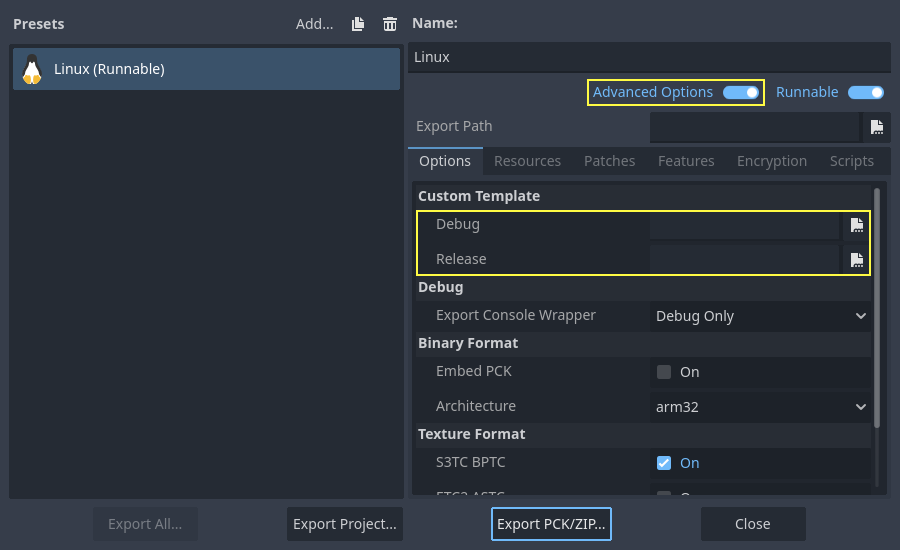
Ni siquiera necesitas copiarlos, simplemente puedes hacer referencia a los archivos resultantes en el directorio bin/ de la carpeta de origen de Godot, de esta manera, la próxima vez que construyas, automáticamente tendrás las plantillas personalizadas referenciadas.
Cross-compiling for RISC-V devices
To cross-compile Godot for RISC-V devices, we need to setup the following items:
riscv-gnu-toolchain. While we are not going to use this directly, it provides us with a sysroot, as well as header and libraries files that we will need. There are many versions to choose from, however, the older the toolchain, the more compatible our final binaries will be. If in doubt, use this version, and download
riscv64-glibc-ubuntu-20.04-gcc-nightly-2023.07.07-nightly.tar.gz. Extract it somewhere and remember its path.mold. This fast linker, is the only one that correctly links the resulting binary. Download it, extract it, and make sure to add its
binfolder to your PATH. Runmold --help | grep supportto check if your version of Mold supports RISC-V. If you don't see RISC-V, your Mold may need to be updated.
Para facilitar la referencia a nuestra cadena de herramientas, podemos establecer una variable de entorno como esta:
export RISCV_TOOLCHAIN_PATH="path to toolchain here"
De esta manera, no tendremos que configurar manualmente la ubicación del directorio cada vez que queramos referenciarlo.
Con toda la configuración anterior, ahora estamos listos para construir Godot.
Go to the root of the source code, and execute the following build command:
PATH="$RISCV_TOOLCHAIN_PATH/bin:$PATH" \
scons arch=rv64 use_llvm=yes linker=mold lto=none target=editor \
    ccflags="--sysroot=$RISCV_TOOLCHAIN_PATH/sysroot --gcc-toolchain=$RISCV_TOOLCHAIN_PATH -target riscv64-unknown-linux-gnu" \
    linkflags="--sysroot=$RISCV_TOOLCHAIN_PATH/sysroot --gcc-toolchain=$RISCV_TOOLCHAIN_PATH -target riscv64-unknown-linux-gnu"
Nota
RISC-V GCC has bugs with its atomic operations
which prevent it from compiling Godot correctly. That's why Clang is used instead. Make sure that
it can compile to RISC-V. You can verify by executing this command clang -print-targets,
make sure you see riscv64 on the list of targets.
Advertencia
The code above includes adding $RISCV_TOOLCHAIN_PATH/bin to the PATH,
but only for the following scons command. Since riscv-gnu-toolchain uses
its own Clang located in the bin folder, adding $RISCV_TOOLCHAIN_PATH/bin
to your user's PATH environment variable may block you from accessing another
version of Clang if one is installed. For this reason it's not recommended to make
adding the bin folder permanent. You can also omit the PATH="$RISCV_TOOLCHAIN_PATH/bin:$PATH" line
if you want to use scons with self-installed version of Clang, but it may have
compatibility issues with riscv-gnu-toolchain.
The command is similar in nature, but with some key changes. ccflags and
linkflags append additional flags to the build. --sysroot points to
a folder simulating a Linux system, it contains all the headers, libraries,
and .so files Clang will use. --gcc-toolchain tells Clang where
the complete toolchain is, and -target riscv64-unknown-linux-gnu
indicates to Clang the target architecture, and OS we want to build for.
Si todo salió bien, ahora deberías ver un directorio bin y dentro de él, un binario similar al siguiente:
godot.linuxbsd.editor.rv64.llvm
Ahora puedes copiar este ejecutable a su dispositivo RISC-V favorito y luego iniciarlo allí haciendo doble clic, lo que debería abrir el administrador de proyectos.
Si más adelante decide compilar las plantillas de exportación, copie el comando de compilación anterior pero cambie el valor de target a template_debug para una compilación de depuración, o template_release para una compilación de lanzamiento.
Utilizar Clang y LLD para un desarrollo más rápido
También puedes usar Clang y LLD para compilar Godot. Esto tiene dos ventajas en comparación con la configuración predeterminada de GCC + GNU ld:
LLD enlaza Godot significativamente más rápido en comparación con GNU ld o gold. Esto lleva a tiempos de iteración más rápidos.
Clang tiende a proporcionar mensajes de error más útiles en comparación con GCC.
To do so, install Clang and the lld package from your distribution's package manager
then use the following SCons command:
scons platform=linuxbsd use_llvm=yes linker=lld
Después de que se complete la compilación, se creará un nuevo archivo binario con el sufijo .llvm en la carpeta bin/.
It's still recommended to use GCC for production builds as it's the compiler used for official builds and is more rigorously tested.
Si ocurre este error:
/usr/bin/ld: cannot find -l:libatomic.a: No such file or directory
Hay dos soluciones:
En el comando SCons, agrega el parámetro
use_static_cpp=no.Sigue estas instrucciones para configurar, compilar e instalar
libatomic_ops. Luego, copia/usr/lib/libatomic_ops.aa/usr/lib/libatomic.a, o crea un enlace simbólico alibatomic_opscon el comandoln -s /usr/lib/libatomic_ops.a /usr/lib/libatomic.a. El enlace simbólico puede garantizar que se use la última versión delibatomic_opssin la necesidad de copiarla cada vez que se actualice.
Using mold for faster development
Para una vinculación aún más rápida en comparación con LLD, puedes usar mold. mold se puede usar con GCC o Clang.
sudo apt-get update
sudo apt-get install -y mold
sudo dnf install -y mold
pacman -Sy --noconfirm --needed mold
Once mold is installed, use the following SCons command when compiling Godot:
scons platform=linuxbsd linker=mold
Using system libraries for faster development
Godot incluye el código fuente de varias bibliotecas de terceros. También puedes optar por utilizar versiones en su sistema de estas bibliotecas. Esto hace que el binario de Godot sea más rápido de vincular, ya que las bibliotecas de terceros están vinculadas dinámicamente. Por lo tanto, no es necesario vincularlas estáticamente cada vez que crea el motor (incluso en pequeños cambios incrementales).
Sin embargo, no todas las distribuciones de Linux tienen paquetes para bibliotecas de terceros disponibles (o pueden no estar actualizados).
Pasar a las bibliotecas del sistema puede reducir los tiempos de vinculación por varios segundos en CPU lentas, pero requiere pruebas manuales según la distribución de Linux. Además, es posible que no pueda usar bibliotecas del sistema para todo debido a errores en los paquetes de bibliotecas del sistema (o en el sistema de compilación, ya que esta función está menos probada).
To compile Godot with system libraries, install these dependencies on top of the ones listed in the Líneas de comandos específicas para cada distribución:
sudo apt-get update
sudo apt-get install -y \
  libembree-dev \
  libenet-dev \
  libfreetype-dev \
  libpng-dev \
  zlib1g-dev \
  libgraphite2-dev \
  libharfbuzz-dev \
  libogg-dev \
  libtheora-dev \
  libvorbis-dev \
  libwebp-dev \
  libmbedtls-dev \
  libminiupnpc-dev \
  libpcre2-dev \
  libsdl3-dev \
  libzstd-dev \
  libsquish-dev \
  libicu-dev
sudo dnf install -y \
  embree-devel \
  enet-devel \
  glslang-devel \
  graphite2-devel \
  harfbuzz-devel \
  libicu-devel \
  libsquish-devel \
  libtheora-devel \
  libvorbis-devel \
  libwebp-devel \
  libzstd-devel \
  mbedtls-devel \
  miniupnpc-devel \
  SDL3-devel
Después de instalar todos los paquetes necesarios, utiliza el siguiente comando para compilar Godot:
scons platform=linuxbsd builtin_embree=no builtin_enet=no builtin_freetype=no builtin_graphite=no builtin_harfbuzz=no builtin_libogg=no builtin_libpng=no builtin_libtheora=no builtin_libvorbis=no builtin_libwebp=no builtin_mbedtls=no builtin_miniupnpc=no builtin_pcre2=no builtin_sdl=no builtin_zlib=no builtin_zstd=no
En Debian estable, necesitará eliminar builtin_embree=no ya que la versión de Embree proporcionada por el sistema es demasiado antigua para funcionar con la última rama master de Godot (que requiere Embree 4).
Puedes ver una lista de todas las bibliotecas integradas que tienen alternativas del sistema ejecutando scons -h y luego buscando opciones que comiencen con builtin_.
Advertencia
When using system libraries, the resulting binary is not portable across Linux distributions anymore. Do not use this approach for creating binaries you intend to distribute to others, unless you're creating a package for a Linux distribution.